
API e integraciones · Guía 7 de 8
Evocon API - Sending production data to Evocon
Traducción en revisión: se muestra el texto original en inglés.
En esta página
- Sending manufacturing data
- API Authentication and headers
- Signal data
- Stop reason data
- Speed loss data
- Operator data
- Scrap data
- Inserting a changeovers for a product
- Inserting a changeover for production order
- Sending production orders to Evocon (Production order integration)
- Sending process data (Process metrics)
Sending manufacturing data
Although it may seem at first that a lot of data is required to visualise production and start getting insights into efficiency, Evocon actually only needs quantity and timestamp of production cycles to get started.
API Authentication and headers
The Evocon API endpoint is https://api.evocon.com/api/
All requests require the following headers:
'Content-Type: application/json;charset=UTF-8''Authorization: Basic <credentials>'
The authorisation credentials can be created by combining the API key and password generated by the guide below.
Signal data
To visualise production, Evocon requires a minimum of one piece of data about the production process. This is called a "signal event", and it has the following properties:
- Timestamp - when a product or a cycle is finished
- Quantity - how many products or cycles were finished at that timestamp
- Device id - unique identifier for that machine or line. (Provided by Evocon)
- Input number - unique identifier for that machine or line. (Provided by Evocon)
In most cases, it is best to send 1 data packet every 30 to 60 seconds. If production cycles are slower than this, a data packet is sent once a cycle is finished. If production is faster, then signals or cycles should be counted for the duration specified and then sent as a single data packet with the sum of cycles during that duration (e.g. once per minute). This will ensure that there is no unnecessary load on the network and the visualisation of data in Evocon is as detailed but clean as possible.
Data packet is sent to our API over a secure HTTPS connection. You will find a few options and examples on how to set it up with your own hardware or software below.
Below are examples for sending signal (production) data to Evocon.
curl 'https://api.evocon.com/api/timeline/<STATION_ID>/signal' -H 'Accept: application/json, text/plain, */*' -H 'Content-Type: application/json' -H 'Authorization: Basic <credentials>' --data-raw '[{"eventTimeISO":"2024-04-19T13:05:00.000+03:00","signalQty":1,"notes":""}]'
The body of the request must be in the format shown above.
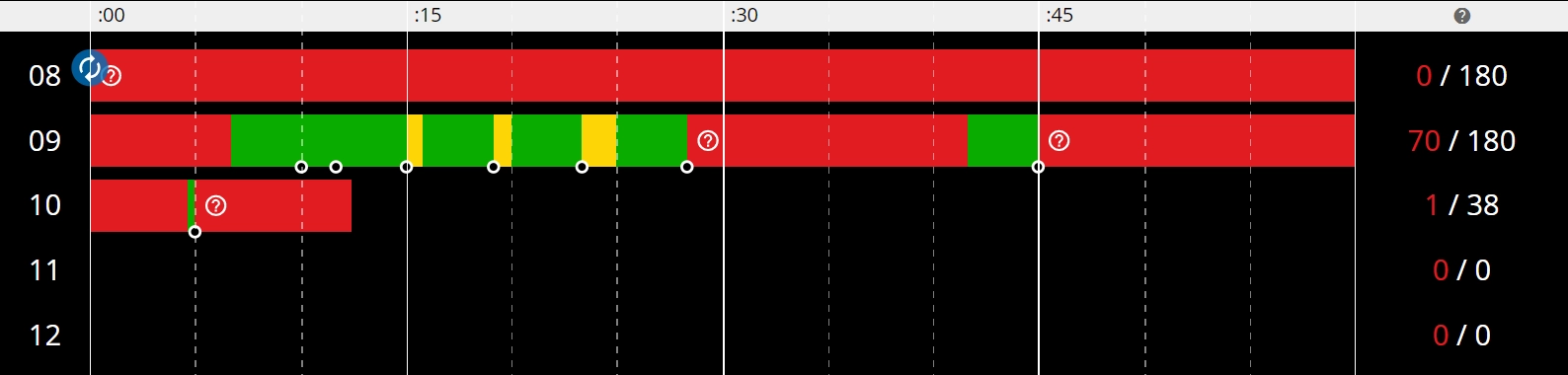
After sending signal data to Evocon, you should see a similar picture that specifies production time (green), slow production time (yellow) and stop time (red)
Stop reason data
After you see some production data in Evocon, red slices surround production time. These bright red areas show production stop time and in standard solution need to be given a reason by the operator. Stop reasons can be inserted by HTTPS POST request to https://api.evocon.com/api/timeline/<STATION_ID>/comments
Data or body of the request must be JSON with the following information:
[ { "commentId": 2, "positionId": 0, "notes": "", "startTimeISO": "2024-05-07T08:00:00.000+03:00", "endTimeISO": null } ]
commentId- stop reason id from Evocon.startTimeISO- Start time of the stop reason. Must be in the shown format with timezone.endTimeISO- null if the duration of the stop is unknown. It will fill in time until the production starts. Same format asstartTimeISOif end time is known.notes- optional - extra information about the stoppositionId- optional - extra information about the position/location of the station
Stop reasons (commentId) can be queried (GET) from this URL with the same headers: https://api.evocon.com/api/comments
Locations can be queried (GET) from this URL with the same headers: https://api.evocon.com/api/position?stationId=<stationId>&lang=en
Example (bash curl):
curl 'https://api.evocon.com/api/timeline/STATION_ID/comments' -H 'Accept: application/json, text/plain, */*' -H 'Content-Type: application/json' -H 'Authorization: Basic <credentials>' --data-raw '[{"commentId": 2, "positionId": 0, "notes": "", "startTimeISO": "2024-05-07T10:05:00.000+03:00", "endTimeISO": null}]'
The body of the request must be in the format shown above.
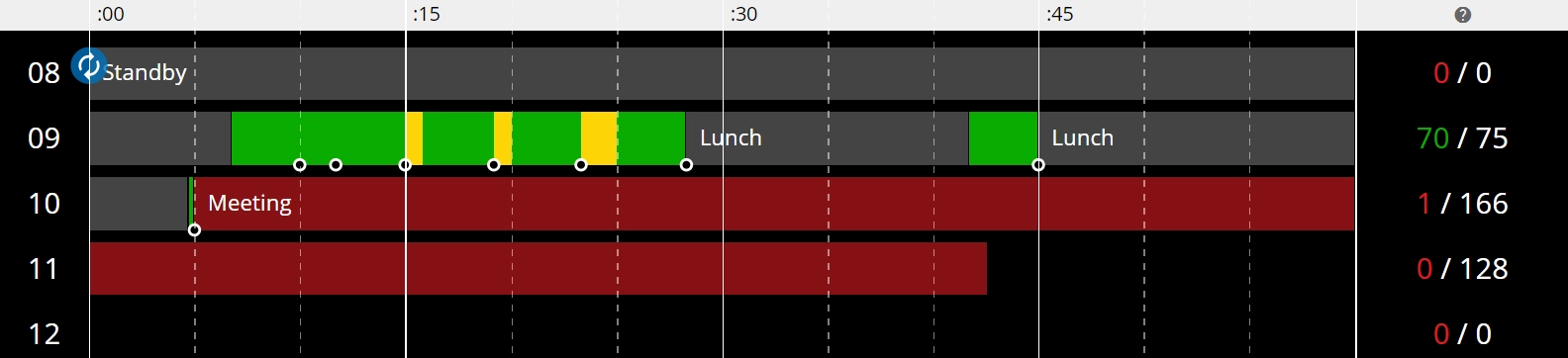
After sending stop data to Evocon, you should see commented stops.
Speed loss data
Yellow areas in production data are representing speed loss. Speed loss reasons can be assigned to those areas. When inserting speed loss reasons they are assigned to specific time period between start time and end time. All yellow areas inside that period will be assigned with specified speed loss reason. Speed loss reasons can be inserted by HTTPS POST request to https://api.evocon.com/api/timeline/<STATION_ID>/performanceloss
Data or body of the request must be JSON with the following information:
[ { "commentId": 2, "positionId": 0, "notes": "", "startTimeISO": "2025-01-28T18:26:04.000+02:00", "endTimeISO": "2025-01-28T18:36:32.000+02:00" } ]
commentId- speed loss reason id from Evocon.startTimeISO- Start time of the area where speed losses are inserted. Must be in the shown format with timezone.endTimeISO- End time of the area where speed loss reasons are inserted. Same format asstartTimeISOif end time is known.notes- optional - extra information about the speed loss reasonpositionId- optional - extra information about the position/location of the station
Speed loss reasons (commentId) can be queried (GET) from this URL with the same headers: https://api.evocon.com/api/performancecomment
Locations can be queried (GET) from this URL with the same headers: https://api.evocon.com/api/position?stationId=<stationId>&lang=en
Example (bash curl):
curl 'https://api.evocon.com/api/timeline/STATION_ID/performanceloss' -H 'Accept: application/json, text/plain, */*' -H 'Content-Type: application/json' -H 'Authorization: Basic <credentials>' --data-raw '[{"commentId": 2, "positionId": 0, "notes": "", "startTimeISO": "2025-01-28T18:26:04.000+02:00", "endTimeISO": "2025-01-28T18:36:32.000+02:00"}]'
The body of the request must be in the format shown above.
After sending speed loss data to Evocon, you should see reason added. Dark yellow indicates that speed loss reason has been added to those areas.

Operator data
It is possible to also gather information about who is working during a shift.
Operator team information can be sent as a PUT request address: https://api.evocon.com/api/team/<stationId>
Data or body of the request must be a JSON with the following information:
[ { "operatorIds": [3,4], "startTimeISO": "2024-05-07T10:00:00.000+03:00", "endTimeISO": "2024-05-07T17:00:00.000+03:00" } ]
startTimeandendTime- When this team starts and ends their workoperatorIds- ids of the operators to assign to this shift
Operators connected to a station can be queried (GET) from this URL: https://api.evocon.com/api/operators?stationId=<stationId>
Example (bash curl):
curl 'https://api.evocon.com/api/teams/STATION_ID' -H 'Content-Type: application/json;charset=UTF-8' -H 'Authorization: Basic <credentials>' --data-binary '[{"operatorIds":[4],"startTimeISO":"2024-05-07T10:00:00.000+03:00","endTimeISO":"2024-05-07T17:00:00.000+03:00"}]'
Scrap data
Scrap quantity can be added by a POST request to: https://api.evocon.com/api/timeline/<stationId>/scrap
Data or body of the request must be a JSON with the following information:
[ { "scrapQty": 1, "qtyType": "delta", "scrapReasonId": 0, "scrapNotes": "notes", "eventTimeISO": "2024-05-07T13:01:00.000+03:00" } ]
scrapQty- amount of signals to send as scrap. Positive numbers increase scrap, negative numbers reduce scrap.qtyType- always"delta"scrapNotes- extra text info about the scrapscrapReasonId- id of a scrap reasoneventTimeISO- Time where to add the scrap in ISO format
Example (bash curl):
curl 'https://api.evocon.com/api/timeline/STATION_ID/scrap' -X POST -H 'Content-Type: application/json;charset=UTF-8' -H 'Authorization: Basic <credentials> ' --data-binary '[{"scrapQty": 1,"qtyType": "delta","scrapReasonId":0,"scrapNotes": "notes","eventTimeISO": "2024-05-08T09:05:00.000+03:00" }]'
Signals with scrap quantity are shown as red circles in the shift view.

Inserting a changeovers for a product
Product change can be added by a POST request to: https://api.evocon.com/api/batches/<stationId>
Data or body of the request must be a JSON with the following information:
{ "productId": 2, "plannedQty": null, "notes": "", "eventTimeISO": "2024-05-07T10:05:00.000+03:00", "lotCode":"123223" }
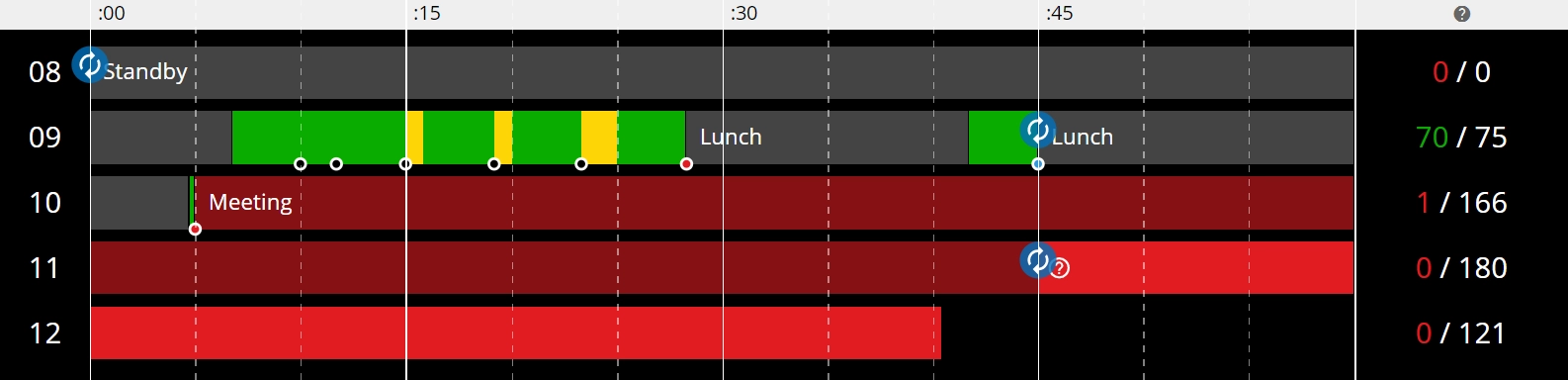
productId- id of the product that starts from that timestampnotes- can be used for tracking production order number or other informationeventTimeISO- Time when the new product starts. Must be in the ISO format with milliseconds (.000) and timezone (+03:00). For example2024-09-11T09:54:00.000+03:00plannedQty- target how many units should be produced. Optional.lotCode- batch or lot identifier. Optional.
Products of a station can be queried from this URL:
https://api.evocon.com/api/products?stationId=<stationId>
Example (bash curl):
curl 'https://api.evocon.com/api/batches/195' -H 'Accept: application/json, text/plain, */*' -H 'Authorization: Basic <credentials>' -H 'Content-Type: application/json' --data-raw '{"productId":25,"plannedQty":null,"notes":"","eventTimeISO":"2024-05-07T10:05:00.000+03:00","lotCode":"123223"}'
Inserting a changeover for production order
Changeover can be added by a POST request to: https://api.evocon.com/api/batches/<stationId>
First, you will need to check which orders are available for a station using https://api.evocon.com/api/jobs?stationId=<stationId>
curl 'https://api.evocon.com/api/jobs?stationId=<stationId>' -H 'Accept: application/json, text/plain, */*' -H 'Authorization: Basic <credentials>' -H 'Content-Type: application/json'
Find the corresponding job id value based on productionOrder and stationId parameters. The id value of a job element in the response is the jobId required in the next request. And the stationId parameter is the one used in the URL.
Then you can POST the changeover for a production order to https://api.evocon.com/api/batches/<stationId>
Data or body of the request must be a JSON with the following information
{ "jobId":1, "plannedQty":<use plannedQty value from the send production order request"> , "unitQty":<use unitQuantity value from the send production order request">, "notes":"", "unitId":"<use unitID value from the send production order request">", "eventTimeISO":"2024-05-16T13:09:59.000+03:00", "lotCode":"123223" }
jobId- id of the production order that starts from that timestampplannedQty- the number of products to be produced for this orderunitQty- the number of products detected by 1 sensor signalnotes- can be used for tracking production order number or other informationunitId- name of the production unit (pcs, kg,…)eventTimeISO- Time when the new product starts. Must be in ISO format with milliseconds (.000) and timezone (+03:00). For example2024-09-11T09:54:00.000+03:00lotCode- batch or lot identifier. Optional.
Example (bash curl):
curl 'https://api.evocon.com/api/batches/1' -H 'Accept: application/json, text/plain, */*' -H 'Authorization: Basic <credentials>' -H 'Content-Type: application/json' --data-raw '{"jobId":1,"plannedQty":1000,"unitQty":1,"notes":"","unitId":"pcs","eventTimeISO":"2024-05-16T13:09:59.000+03:00"}'
Sending production orders to Evocon (Production order integration)
Production orders API now has its own page with all of the information
Evocon API - Sending production orders to Evocon
Sending process data (Process metrics)
It's possible to send additional process metrics values to Evocon and visualise these in the Shift view. For example temperature, pressure, electricity usage, CO2 usage or any other measurable digital or analog value.
This is called a "process metrics", and it has the following properties:
measureName- name of the measure that data is being sent for.measureValue- value of this measure at the eventTime time.measureUnit- unit of the measure, free text up to 5 characters.eventTime- time of this data point in ISO format with milliseconds (.000) and timezone (+03:00). For example2024-09-11T09:54:00.000+03:00stationId- id of the station where this metric value should be connected to
In most cases, it is best to send this data every 60 seconds.
Below is an example for sending process metrics data to Evocon.