
Security and audit · Guide 5 of 7
Activity logs
Overview of Evocon's Enterprise activity logs for Shift View and Settings: their benefits, who can access them and what information they contain.
On this page
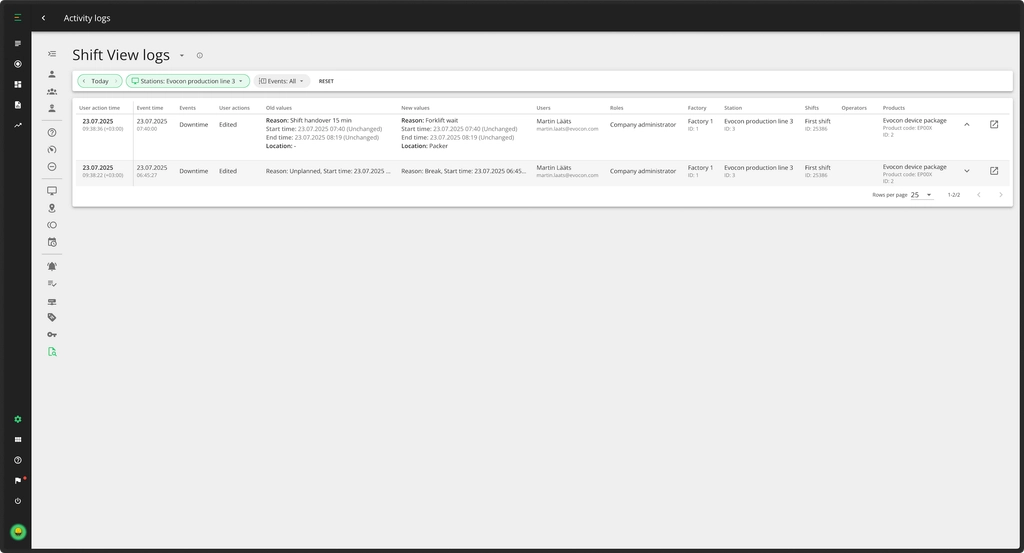
At Evocon, we maintain two types of logs: one that tracks user actions in Shift View and another that records changes made in Settings, detailing what was changed, when, and by whom.

What are the benefits these logs offer?
User activity logs feature is designed to:
- Provide traceable records: Every user action, such as changes, adjustments, or interactions, is documented with a timestamp and the responsible user.
- Support compliance: Ensures clear records for regulatory audits.
- Enhance security: Prevents unauthorized changes and aids in security investigations.
Who can access these logs?
Access to user activity logs is based on user roles:
- Company administrator: Read-only access to all logs.
- Factory administrator: Read-only, limited to data related to their factory (only if "Old" or "New" values include their factory).
- Office user: No access.
- Shift View user: No access.
What information do the logs have?
Logs configuration
- Logs themselves are under configuration.
- Logs only show the features that are enabled for the station/factory/client.
No system events
- System status changes or automatic actions (e.g., auto-comments, system-added signals) are not shown in the logs.
Modifications by the Evocon Support team
- Changes made by the support team are displayed with the identifier "name@evocon.com" and treated as regular log entries.
Logs contents & structure
- User actions only: Logs capture only user actions (adding, editing, deleting).
- Value fields (old, new): Capture specifics of the timeline event modified by the user.
- Context fields: Provide additional context like location, products and users involved.
- Context at event time: Context fields are recorded as of the start time of the timeline event.
- Inalterable entries: Once saved, log entries cannot be altered.
- One user action = one log row: Each user action generates one row in the logs.
- Shift View optional fields: These are not shown if empty.
- User action time representation: Chronological order, represented in user's (viewer's) local time. Hovering will show the UTC time.
Display limitations
- 200 rows can be shown at a time (as one "page").
Delay
- Logs appear with a ~2 minute delay (after the user action).